App
Note
The app is only intended for members and instructors, and therefore cannot be used by the people who administer the association. There are no administrator functions in the app — only member and instructor functions. All administration of the association takes place via the web. You also cannot log in to the app as an administrator. Only members — including members who are instructors — can log in to the app.
MemberOrganizer gives the association the option to offer an app to its members and/or instructors. The app can be downloaded to mobile phones and tablets from the App Store (iOS) or Play Store (Android), where you search for “MemberOrganizer”.
The app can do some of the same things that members and instructors can already do in the Member Portal today. The advantage of the app is that it naturally ends up on the phone’s home screen, so the member/instructor can easily find it. In addition, the app remembers who is logged in, so you should always be logged in.
Enable the app
Before members and/or instructors can log in to the app, this must be enabled. Do this under “Configuration -> Member Portal -> App”.
When that is done, a member or instructor who has downloaded the app can log in with for example member number and password or email address and password.
Functions in the app
Below are the functions that currently exist in the app. Not all functions from the Member Portal are available in the app.
Functions in the app:
Subscribe and unsubscribe for team training for members
Booking of courts for members
Members can view previously sent messages
Notification directly in the app
Online attendance for instructors
Time registration for instructors
Communication via email and/or SMS from instructors to members
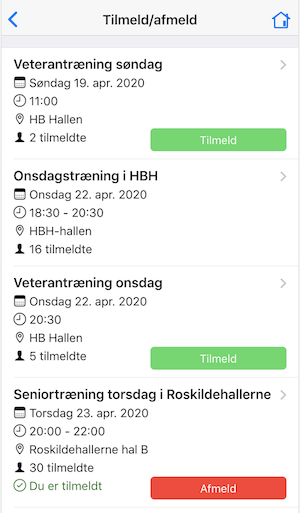
Subscribe and unsubscribe for team training
If you are for example a fitness centre offering weekly classes — for example bike or yoga — members can easily subscribe and unsubscribe for the classes via the app.
If waiting lists are used for the classes, members can also join the waiting list when a class is full.
Subscribing and unsubscribing for teams is especially suited to adult teams, where members typically manage their own attendance. If you have children’s teams, see “Online attendance” below, where the instructor can register via the app which members have shown up.
Here is a screenshot from the app showing subscribe and unsubscribe for adult teams:
Read more about team training here: Team training with enrollment
Booking of courts
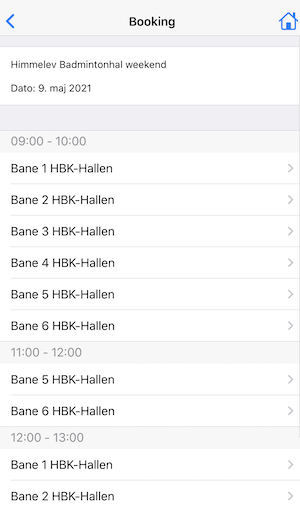
If you are for example a tennis, padel, or badminton club and want members to be able to book available courts themselves, members can access this via the app.
Here is a screenshot from the app showing one of the screens used when booking a court:
Read more about booking here: Booking
Members can view previously sent messages
When you send a message via email from the system to members, the message — in addition to being delivered to the member’s email address — can be viewed by the member in the app. Messages are stored for 60 days, after which the content of the message is deleted.
Notification directly in the app
If for example an email is sent from the system to members, members who have turned on notifications for the app on their phone or tablet will receive a message directly on the screen that they can tap to read the full message from the association.
Online attendance
If you are for example a badminton club, gymnastics association, or other type of association offering team training, the instructor can mark attendance for members at training via the app.
This is especially suited to youth teams, where members do not subscribe and unsubscribe in advance themselves.
Read more about online attendance here: Online attendance
Time registration
If you are an association whose instructors need to record time, instructors can do this via the app.
Read more about online time registration here: Time registration
Communication via email and SMS
If you are an association whose instructors need to be able to send emails and/or SMS messages to members, instructors can do this via the app.
Read more about online communication via email and SMS here: Communication